How Does Background Remove Help You Create Perfect Product Photos?
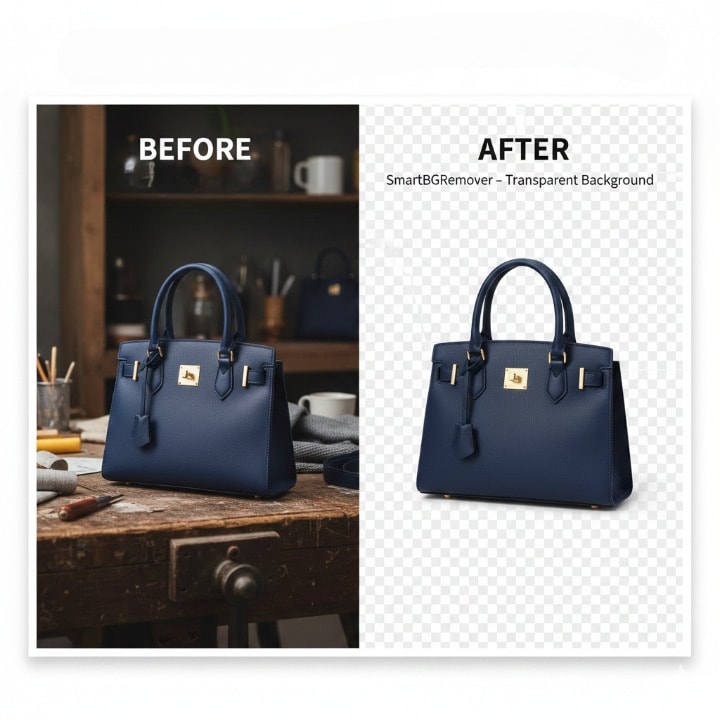
Background Remove – What Makes It So Useful?
Ever noticed how a clean, distraction-free photo grabs your attention instantly? That’s the power of background remove. Whether you’re an online seller, designer, or social media creator, removing the background from an image can completely change how your visuals look and feel.
It’s not just about cutting out the background—it’s about focusing the viewer’s eye on what truly matters.
Try it for free on SmartBGRemover
Why Background Remove Is a Game Changer
If you’ve ever tried editing product images manually, you know how painful it can be—hours spent erasing pixels or tracing outlines. With AI-based background removal tools, the process takes seconds.
- For e-commerce: Product photos look consistent and professional on white or transparent backgrounds.
- For designers: It speeds up workflow for banners, mockups, and creative layouts.
- For photographers: You can create layered compositions without complex editing.
How Background Remove Works
Here’s the thing—modern background removal tools use AI to detect subjects automatically. They analyze edges, lighting, and color contrast to separate the subject from its surroundings.
You upload your image → the AI does the work → you get a clean, transparent background.
No Photoshop skills required.
Real-World Uses of Background Removal
Let’s break down a few examples where it makes a real difference.
Benefits of Using Background Remove Tools
- Saves Time – No manual editing, no complex tools.
Manually removing backgrounds takes hours of zooming, erasing, and tracing edges. Background remove tools do the same job in seconds using AI detection. You just upload your photo, and the tool instantly gives you a clean, transparent background—no design experience or editing skills needed.
- Improves Branding – Consistent image style across all platforms.
Consistent imagery builds brand trust. By removing backgrounds, you can apply the same clean look to all your photos—whether they’re for your website, social media, or ads. This uniform style makes your brand appear more professional and recognizable.
- Increases Conversions – Clean visuals make your products more appealing.
People are naturally drawn to clarity. Clean product photos without messy or distracting backgrounds make your items stand out, helping customers focus on what really matters—the product itself. That small visual improvement often leads to higher engagement and sales.
- Flexible for All Uses – Works for social media, catalogs, print, and websites.
A single image can serve multiple purposes once its background is removed. You can place it on banners, catalogs, e-commerce listings, or even marketing videos without worrying about mismatched colors or cluttered layouts. One edit opens up endless design options.
Quick Tips for Best Results
- Use high-resolution photos for cleaner cuts.
Sharper images help the AI detect edges more accurately, giving you smoother, more natural cutouts.
- Choose simple, solid backgrounds when shooting.
Plain backgrounds make it easier for tools to identify the subject and reduce editing errors.
- Avoid shadows directly under the subject.
Strong shadows can confuse the AI, causing uneven edges. Try using balanced lighting for cleaner results.
- Always preview before downloading your final result.
Take a moment to check the edges and transparency before saving. Small touch-ups can make your final image look flawless.