How to Get Pure White Background for Amazon Product Photos Free
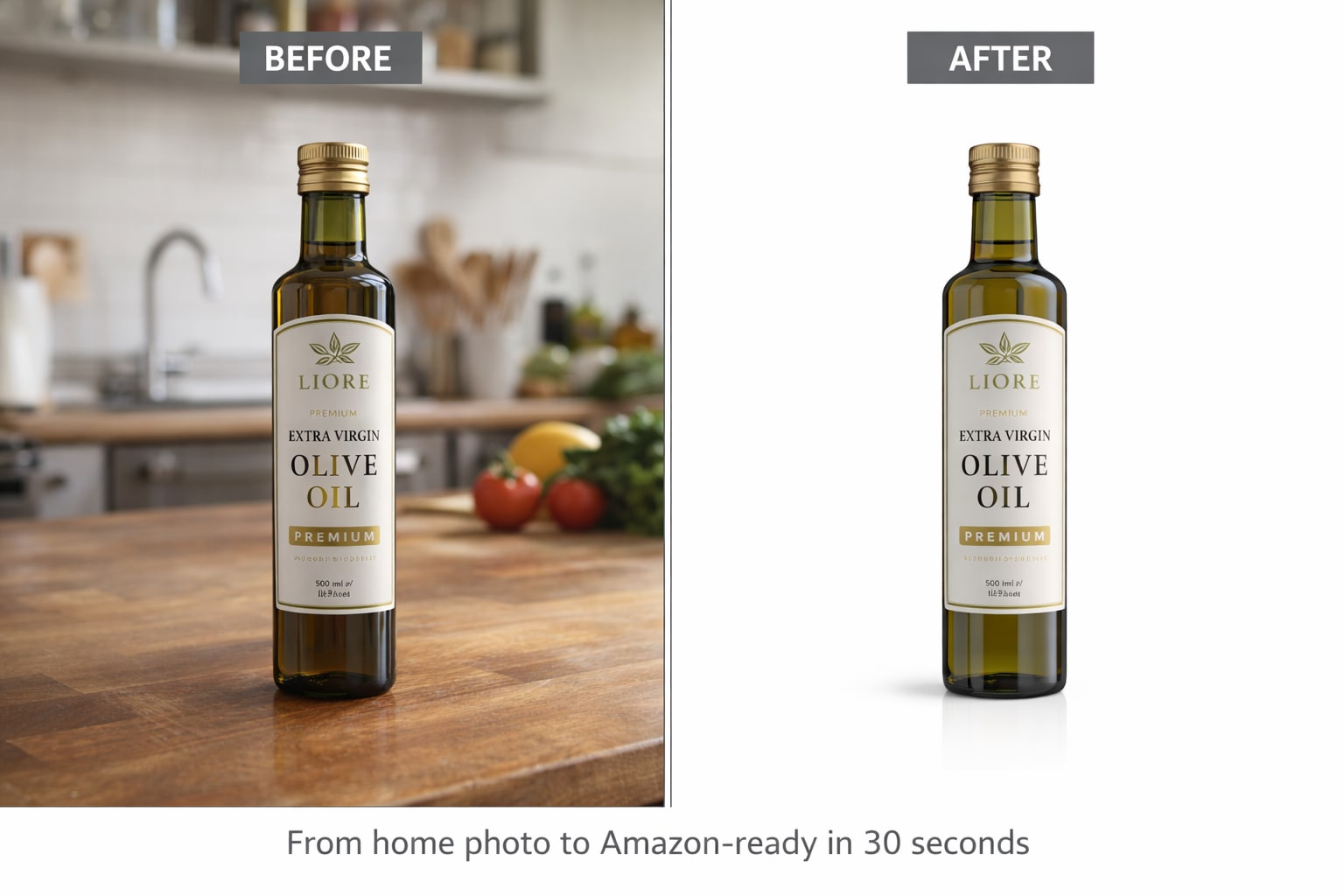
If you sell on Amazon, you already know the rule.
Your main product image must have a pure white background. Not off-white. Not cream. Not white with shadows.Pure white — RGB 255, 255, 255.
Most sellers shoot products on white paper or white fabric and assume that qualifies. It often does not. Amazon's system checks background values at the pixel level. Anything below #FFFFFF gets flagged — and your listing gets suppressed from Amazon search results entirely.
This guide explains exactly why most DIY white backgrounds fail Amazon's check, and the fastest free way to get compliant product photos every time.
Why Your Amazon Product Image Keeps Getting Rejected
Amazon's pure white background requirement is the number-one reason product listings get suppressed in 2026. Thousands of sellers lose search visibility every day because their background appears white to the eye but fails Amazon's automated pixel-level check.
Here is exactly why it keeps happening:
Shadows fail the check.
When a product sits on a white surface, it casts shadows. Those shadows create grey areas that read below #FFFFFF.Amazon's system flags them automatically.
Lighting creates gradients.
Even professional lighting setups produce subtle brightness differences across a white background. The edges of the frame are slightly darker than the center. That gradient fails Amazon's pure white background requirement.
Camera white balance shifts the color.
A warm white balance makes backgrounds appear cream or yellow-tinted. A cool white balance adds a blue tint. Neither reads as pure white RGB 255, 255, 255.
JPEG compression changes pixel values.
Saving as JPEG shifts white background pixels from#FFFFFF to #FEFEFE or lower. That small shift is enough to fail Amazon's automated image compliance check and suppress your listing from search results.
The only reliable fix is to remove the original background completely and replace it with a digitally generated pure white background — guaranteed RGB 255, 255, 255 every time.
Amazon Product Image Requirements 2026
Failing any of these results in your listing being marked as Search Suppressed. Your product disappears from Amazon search results entirely until the image is corrected and reprocessed by Amazon's system.
Step 1 — Photograph Your Product Anywhere
You do not need a white background when shooting. Any background work will be completely removed.
Tips for better results:
- Shoot near a window for natural, even lighting
- Keep the product centered and fully in frame
- Avoid harsh direct light that creates strong shadows
- Use the highest resolution your phone or camera supports
- Keep the entire product in sharp focus
Step 2 — Open Smart BG Remover
Go to smartbgremover.com. No account registration needed. No software to install. Works on desktop and mobile browsers without any app download.
Step 3 — Upload Your Amazon Product Photo
Drag and drop or click to upload your product image. JPEG, PNG, and WebP all work. The AI starts processing your image immediately after upload.
Step 4 — AI Removes the Background in Seconds
The tool automatically detects your product and removes everything behind it — shadows, floors, walls, colored surfaces, and cluttered backgrounds. No manual selection needed. No Photoshop skills required.
Step 5 — Apply Pure White Background
After background removal, select white as the background color. The tool applies a digitally generated pure white RGB 255, 255, 255 background that meets Amazon's exact pixel-level requirement. No shadows. No gradients. No compression artifacts.
Step 6 — Download and Upload to Amazon
Download as JPEG with a white background. The background value is exactly #FFFFFF — guaranteed to pass Amazon's automated image compliance check. Upload directly to your Amazon listing without any additional editing.
Why DIY White Backgrounds Keep Failing Amazon
Most sellers try these approaches first — and keep getting their listings suppressed:
White paper background — fails.
The paper reflects the surrounding colors and creates subtle shadows under the product. Amazon's system detects these as non-white pixels.
White fabric background — fails.
Fabric texture creates uneven brightness across the background surface. The weave pattern shows as grey variations at the pixel level.
White wall background — fails.
Walls have texture, dust, and paint variations that create non-uniform brightness. Rarely reads as pure RGB 255, 255, 255.
Lightbox setup — inconsistent.
Even professional lightbox setups produce backgrounds that are 95-98% white, not 100%. That 2-5% differenceis enough for Amazon's system to flag the image.
Digitally generated white background — passes.
Removing the original background and replacing it with a generated pure white value guarantees #FFFFFF at every pixel. This is the only method that works consistently every time.
Amazon Product Categories That Need a White Background
Clothing and Apparel
Fabric products shot on mannequins or flat lay surfaces rarely have pure white backgrounds due to fabric shadows. Background removal fixes every garment without reshooting.
Jewelry and Accessories
Metal and gemstone products reflect surrounding colors and cast complex shadows. AI background removal handles reflective surfaces with accurate edge detection.
Electronics and Tech
Dark-colored electronics on white surfaces create strong contrast shadows that get removed along with the background.
Beauty and Skincare
Bottles and packaging with complex shapes get cleancutouts that highlight label details and product design.
Home and Kitchen
Large products with irregular shapes are processed accurately with AI edge detection, preserving every product detail.
Toys and Games
Colorful products with complex outlines are processed without losing fine edge quality or detail.
How to Check if Your Background is Pure White
After processing your Amazon product image, verify the background before uploading:
Color picker check.
Open the image in any photo editor. Use the color picker and click on the background. Value should read R:255 G:255 B:255 or #FFFFFF.
Zoom check.
Zoom into the corner at 100% zoom. Background pixels should appear completely white with zero grey or color tint visible.
Amazon preview check.
Upload to Amazon's listing builder and use the image preview. Amazon will flag non-compliant backgrounds before the listing goes live.
Free vs Paid Tools for Amazon White Background
Tool | Price | Watermark | Signup Required | Pure White BG |
Smart BG Remover | Free | NO | NO | Yes |
remove.bg | Paid for HD | Yes on free | Yes | Yes |
Canva | Pro plan only | NO | Yes | Yes |
Adobe Express | Paid | NO | Yes | Yes |
Photoshop | Paid subscription | NO | Yes | Manual only |
PhotoRoom | Paid | Yes on free | Yes | Yes |
Smart BG Remover is the only completely free option, requires no account registration, adds no watermark to full-resolution downloads, and includes a direct white background application in the same tool.
Tips for Better Amazon Product Photo Results
Shoot on a light surface.
Dark wood or colored tables make background removal harder and can leave edge artifacts. Use a light or neutral surface under your product.
Use even, natural lighting.
Harsh shadows from direct light confuse AI detection and leave ghosting around product edges. Window light or a simple softbox works well for clean results.
Keep the product fully in focus.
Blurry edges are the hardest for AI to remove cleanly. Sharp focus on the entire product produces the most accurate cutout results.
One product per photo.
A single clear subject always gives more accurate detection than multiple products in the same frame.
Check edges at 100% zoom.
After background removal, zoom into product edges at full resolution before downloading. Clean edges look natural — not jagged or artificially sharp.
Who Gets the Most Value From This
Amazon FBA and FBM sellers shooting products at home get the most value. No photography studio needed — just a phone camera and Smart BG Remover.
New Amazon sellers who need compliant product images immediately without spending money on photographers or expensive editing software.
Established sellers fix suppressed listings quickly without waiting for photographers or editing agencies.
Dropshippers who receive messy supplier images and need to clean them up before adding to Amazon listings.
Multi-platform sellers who need the same product image to work on Amazon, Shopify, Etsy, and eBay simultaneously.